
ArchitecturaAI Deep-Dive: Non-Destructive Image Versioning with a Branching Transformation Tree
Table of Contents (5 sections)▸
When an architect, interior designer, or real estate stager uses generative AI to renovate a property photo, creative exploration is never linear.
Suppose you upload a raw photograph of a dated living room (Living_Room_Original.jpg). First, you run a Smart Declutter pass to strip away the old furniture while locking the windows and structural beams. From that clean architectural shell, you want to explore three completely different buyer personas:
- Branch A: Nordic Oak flooring + Calacatta Marble countertops followed by a Golden-Hour Twilight lighting pass.
- Branch B: Minimalist Microcement + Matte Black fixtures followed by a Sunny Day pass.
- Branch C: Warm Mediterranean Terracotta followed by a Freeform AI Skylight edit.
In a traditional editor with a linear Undo / Redo stack, backing up to the Decluttered Shell and generating Branch B destroys or buries Branch A.
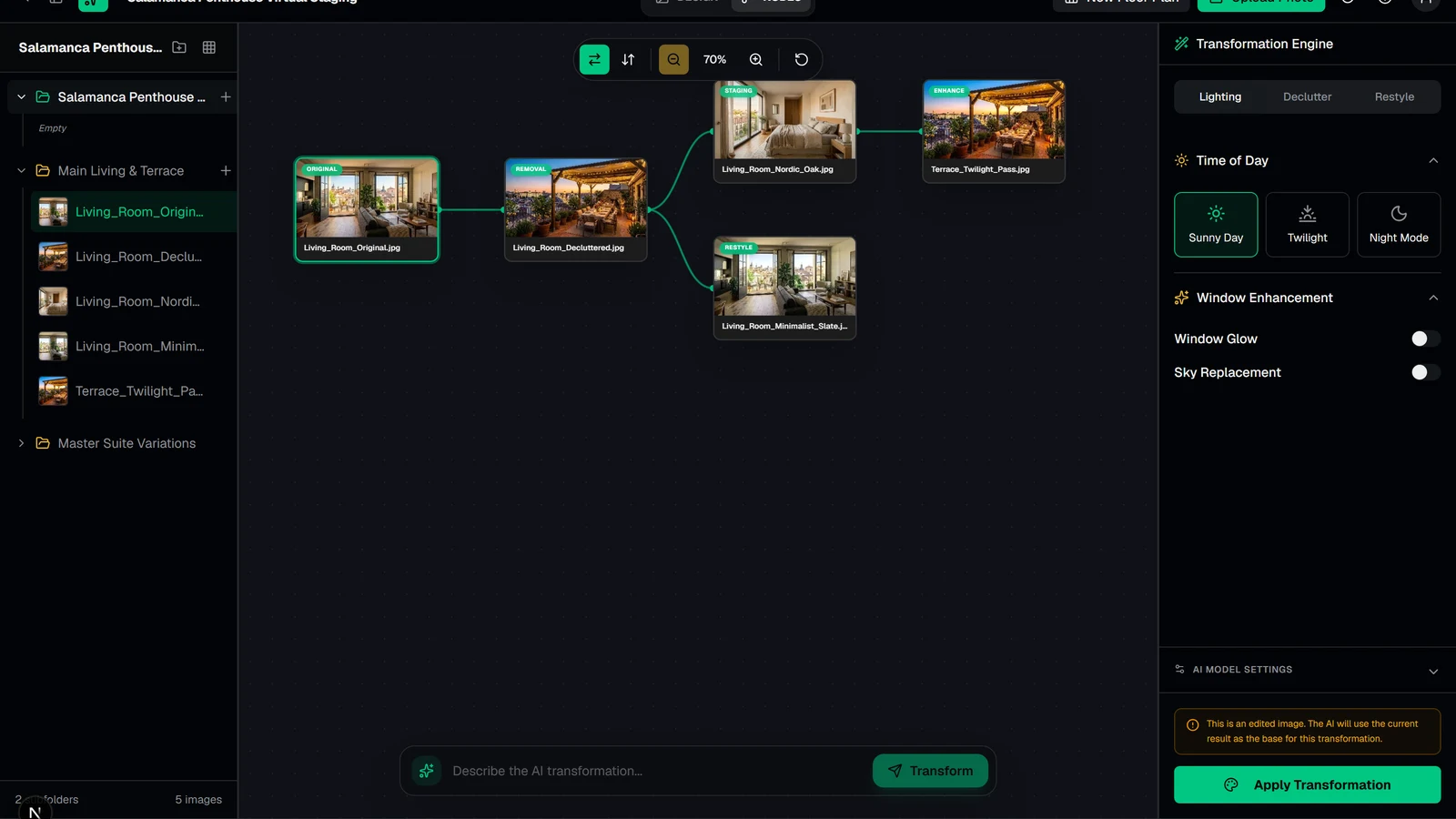
To solve this in ArchitecturaAI, we engineered a dedicated NODES Image Tree Versioning Mode (components/transformation-canvas.tsx and lib/stores/canvas-store.ts) right alongside the standard DESIGN viewport.
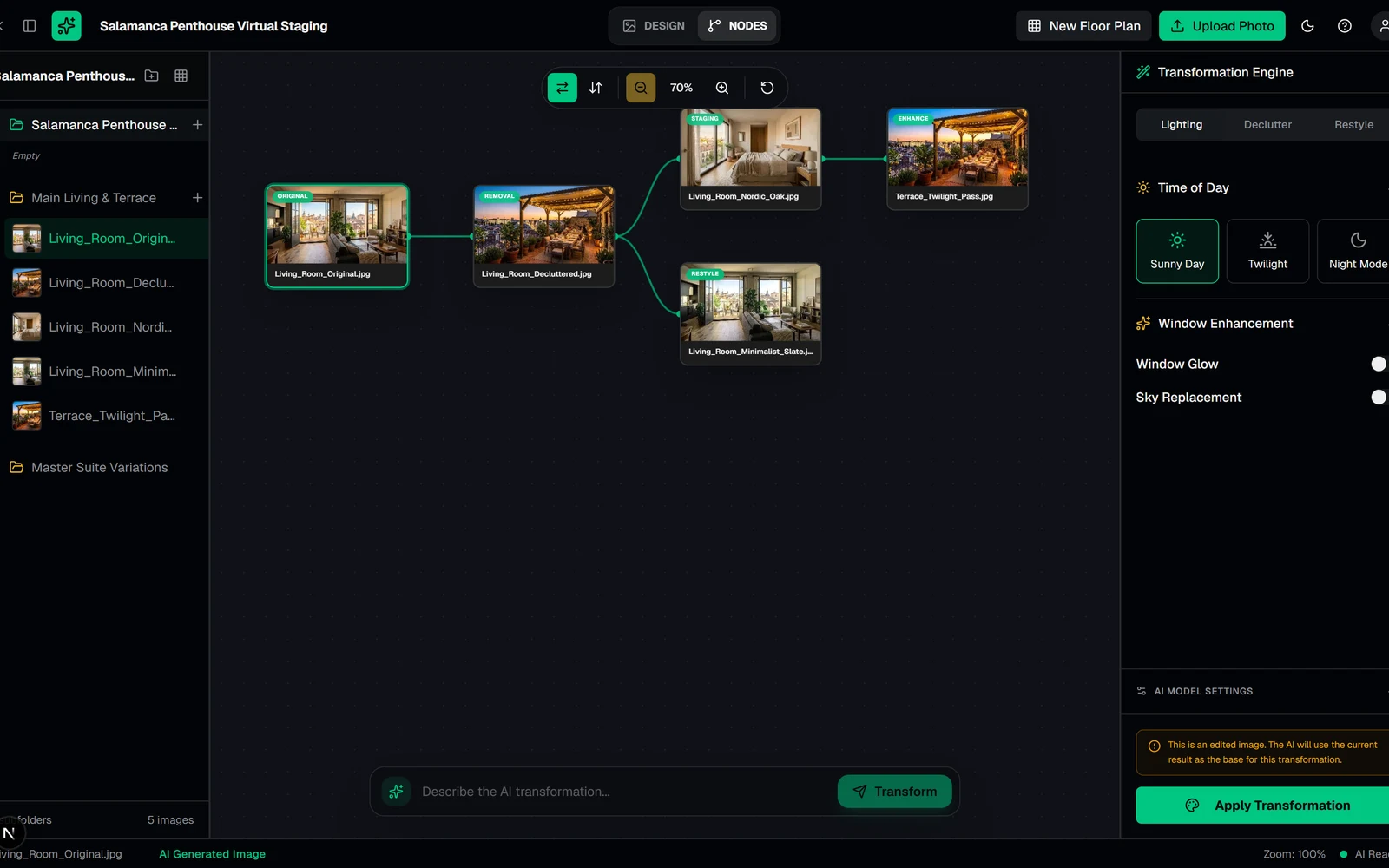 Click to zoomArchitecturaAI NODES Mode — Interactive Branching Transformation Tree for AI Virtual Staging
1. Relational Lineage via parentImageId#
At the database and state layer (lib/types.ts), every Image record in a project folder carries a nullable self-referential foreign key parentImageId alongside its transformation metadata:
typescriptexport type TimeOfDay = "sunny" | "twilight" | "night"; export type TransformationType = "restyle" | "declutter" | "lighting" | "freeform"; export interface Image { id: string; projectId: string; folderId: string | null; parentImageId: string | null; // null = Original Source Upload (Tree Root) name: string; imageUrl: string; thumbnailUrl: string | null; transformationType: TransformationType | null; transformationConfig: { timeOfDay?: TimeOfDay; materials?: { id: string; name: string; category: string; color: string }[]; declutterOptions?: { removeFurniture: boolean; removeWallArt: boolean; removePlants: boolean; removeAccessories: boolean; }; } | null; }
- Root Nodes (
parentImageId === null): Original photographs uploaded from the camera or listing folder. - Child Nodes (
parentImageId !== null): Every time a user triggersApply Transformationin either theDESIGNview or directly from theNODEScanvas prompt bar, the resulting image is persisted withparentImageIdpointing to the currently active source image. - Zero-Cost Branching: Selecting any intermediate node in the tree and running a new pass automatically creates a sibling branch without duplicating or mutating ancestor states.
2. Building the Tree & Guarding Against Corrupted Cycles#
When switching the editor header toggle from DESIGN to NODES, useCanvasStore.buildTreeFromImages(images, rootImageId) converts the flat folder image array into an in-memory adjacency tree (buildTree) and runs a depth-first cycle detector (detectCycle):
typescriptfunction buildTree(nodes: TransformationNode[]): { roots: TreeItem[]; hasCycle: boolean } { const map: Record<string, TreeItem> = {}; const roots: TreeItem[] = []; let hasCycle = false; for (const n of nodes) { map[n.id] = { node: n, children: [] }; } for (const n of nodes) { if (n.parentId && map[n.parentId]) { if (n.parentId === n.id) { hasCycle = true; roots.push(map[n.id]); continue; } map[n.parentId].children.push(map[n.id]); } else { roots.push(map[n.id]); } } const detectCycle = (item: TreeItem, visited: Set<string>): boolean => { if (visited.has(item.node.id)) return true; visited.add(item.node.id); for (const child of item.children) { if (detectCycle(child, new Set(visited))) return true; } return false; }; for (const root of roots) { if (detectCycle(root, new Set())) { hasCycle = true; break; } } return { roots, hasCycle }; }
3. The Recursive Subtree-Span Layout Algorithm#
Rather than pulling in a heavyweight external graph layout dependency like Dagre or ELK just to position transformation trees, we wrote a deterministic Recursive Subtree-Span Layout Engine (layoutHorizontal and layoutVertical) in under 60 lines of TypeScript.
How It Works#
- Compute Leaf Span (
subtreeSpan): Every leaf node occupies unit slot. Every internal node's span is the sum of the spans of its children: - Center Parents Over Their Subtree Slot Range: At tree depth and starting leaf slot , a node with span is placed at the exact midpoint of its children's vertical (or horizontal) span:
- Partition Slots Across Children: Each child is recursively assigned the contiguous sub-interval , guaranteeing that no two subtrees can ever collide or cross edges, regardless of tree depth or branching factor!
4. Animated Cubic-Bezier SVG Edges & Semantic Badges#
In TransformationCanvas (components/transformation-canvas.tsx), edges and nodes are rendered in a synchronized pan-and-zoom coordinate space (canvasOffset, canvasZoom from 0.1x to 3.0x) with one-click switching between Horizontal (LR) and Vertical (TB) tree orientations:
- Cubic-Bezier Connectors (
CanvasEdge): In horizontal layout, each edge connects the right connector port of the parent(from.x + NODE_W, from.y + NODE_H / 2)to the left connector port of the child(to.x, to.y + NODE_H / 2)via a smooth SVG cubic Bezier curveM x1 y1 C midX y1, midX y2, x2 y2animated with Framer Motion (pathLength: 0 -> 1). - Semantic Operation Badges (
getBadgeColor): Each node card displays its lightweight WebP thumbnail (thumbnailUrl), editable title, and a color-coded badge indicating the exact AI operation that produced that child:- Emerald (
bg-emerald-500/90):Restyle: Nordic Oak... - Rose (
bg-rose-500/90):Declutter - Amber (
bg-amber-500/90):Twilight/Sunny/Nightlighting passes - Violet (
bg-violet-500/90):Free Transformationprompt edits
- Emerald (
- Direct Canvas-to-Editor Handoff:
Double-clicking or clicking the
Open in Design Viewaction button on any node in the tree immediately loads that exact historical variation into the mainDESIGNsplit-screen comparison editor.